


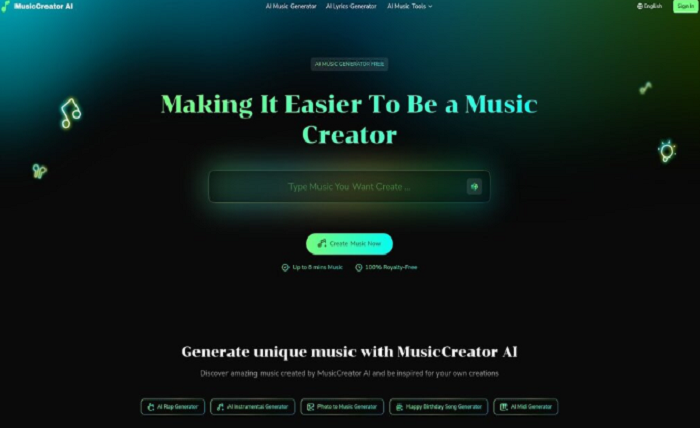
MusicCreator AI is a powerful AI-powered platform designed to make music creation super easy, especially if you want to turn text into music. Whether you are just starting out or you already know a lot about music, this tool helps everyone create songs directly from written words. With MusicCreator AI, you don’t need to know any music theory or play any instruments. Simply type your ideas, lyrics, or even short thoughts, and let the AI work its magic. The platform creates melodies, rhythm, and mood that match your text, so your imagination is truly all you need. This is a great way for anyone to explore text to music and bring their stories to life with sound.
The Good, The Bad, and The Facts
MusicCreator AI has many strengths. First, it creates music fast—often in just seconds. You can use it for free with a trial, and every track you create is 100% royalty-free. This means you can use your music anywhere without worrying about copyright problems. The platform is all-in-one, giving you different tools like a MIDI editor, AI vocal remover, and even a way to make music from photos! If you want to try Text To Music, the process is super simple: write your idea, let the AI compose, and then listen and edit as you like. You can also fully customize your music and share your song with friends. The biggest advantage is that you own all the music you make with MusicCreator AI.
On the flip side, while most users find MusicCreator AI really helpful for turning text to music, some may want even more advanced editing features. But for most creators, the balance of easy use, instant results, and creative freedom makes this platform an awesome choice.
| Feature | Description |
| Text to Music | Instantly creates music from any written idea, no musical skills required. |
| Royalty-Free Tracks | All generated music can be used for videos, podcasts, and more without extra fees. |
| Easy Editing | Includes a MIDI editor and tools for customizing your song after it is made. |
| Ownership | You fully own every song you make—publish confidently! |
Loudly: Bringing Text to Music to the Next Level
What is Loudly?
Loudly is an advanced AI tool that makes it easy for anyone to turn text into music. If you’ve ever wanted to create your own unique songs just by typing out your ideas, Loudly is designed to help! With this platform, you can pick a genre, select a mood, or set a theme, and the AI instantly generates music that matches what you’re looking for. Text to music becomes simple and fun, even if you have no music background.
On Loudly, you get access to features like the AI Music Generator, AI Sample Generator, and the Stem Splitter. The AI Music Generator helps you create full tracks in a matter of seconds. The Text to Music tool lets you use your words to guide the music creation process. You also have royalty-free templates, which means you don’t have to worry about copyright issues when you use the music.
Worth It or Not?
With Loudly, everyone from beginners to pros finds it easier to create music for videos, podcasts, livestreams, games, and even DJ sets. The platform offers different pricing options, including a free plan if you just want to try it out. If you need more functions, you can upgrade to Personal or Pro plans for extra downloads, longer songs, and more commercial rights.
| Plan | Features |
| Free | Limited track creation, previews only, 1 download per day, non-commercial use |
| Personal | 900 tracks/year, 5 stem packs, 5 sample packs, personal license for commercial use |
| Pro | 3000 tracks/year, 20 stem packs, 20 sample packs, pro license for wide commercial use |
Loudly is a good fit for people who want fast, high-quality, and royalty-free music creation by just using text. The platform also lets you distribute your music to Spotify, Apple Music, YouTube, and more. This makes Loudly one of the top choices if you want to explore text to music technology quickly and safely.
Voicemod: Making Songs from Text Has Never Been Easier
Have you ever thought about turning your words into music? Voicemod makes this possible and super easy. With their online text to music tool, anyone can create a song just by typing in some text. Whether you want to make your friends laugh or share a unique song online, voicemod free pro gives you the power to turn simple sentences into catchy tunes right from your phone or computer.
What is Voicemod?
Voicemod is a free AI music generator that lets you create songs from text. Just type your lyrics, pick your favorite singer and music style, and the AI does the rest. You can choose from seven different AI singers and a variety of instrumentals, like Pop, Trap, Hip Hop, or Classic. This lets you try out lots of different sounds for your fun song creations. The best part? It all happens online, so you don’t need to download anything to get started.
Hits, Misses, and Must-Knows
| Feature | Details |
| Easy to Use | Just type your text, pick a singer and style, and let the AI create your song. |
| Completely Online | Works on any device, no downloads required. |
| Shareable | Instantly share your creations with friends and family. |
| Multiple Singers and Styles | Choose from 7 AI singers and a range of instrumentals. |
| Always Updating | New songs and features are being added regularly. |
Before you get started, keep in mind that while Voicemod is free and fun, the song choices and voices you can use are limited — but the team is adding more all the time! Use it to create memes, celebrate a special moment, or just have a laugh with friends. No matter what, Voicemod makes the text to music experience quick and enjoyable for everyone.
Mubert: Custom Text to Music in Seconds
What is Mubert?
Mubert is a powerful AI-powered platform that brings your ideas to life by creating music from text prompts in just seconds. With Mubert, anyone can make their own original music tracks—whether you want a calming melody, a lively beat, or something dramatic for a video. All you do is enter your words describing the emotion, style, or vibe you want, and Mubert’s text to music generator quickly analyzes your prompt and turns it into a fully polished, royalty-free audio clip. This tool is super easy to use for beginners and professionals alike, making music creation as simple as typing and clicking. You get instant access to your custom track, ready to download and use anywhere you need. Mubert’s technology works right in your browser, so there’s no need to download anything extra. This is music made fast, easy, and fun—just with words!
What’s Hot & What’s Not
What makes Mubert popular is its speed and flexibility. You can produce a wide variety of music styles, moods, and genres with simple text prompts, from beautiful ambient tracks to thrilling background scores, all within seconds. Many creators love being able to tweak their prompts for totally different sounds, and the service is entirely online—no downloads needed. If you want a seamless music background for your project, Mubert’s loop mode is a big plus. And if you’re a business or agency, there are scalable plans that let you generate hundreds or thousands of tracks every month. While you get plenty for free, advanced features like longer tracks and unlimited downloads come with premium plans. Keep in mind, the music is for personal or licensed use, so sharing or distributing it to public streaming services is not allowed. Overall, Mubert stands out for making text to music easy, fast, and royalty-free.
| Feature | Mubert Highlights |
| Fast Music Creation | Get custom tracks in seconds with text prompts. |
| Royalty-Free | All generated music is licensed for personal or commercial use. |
| Easy to Use | No experience needed; everything is done in your browser. |
| Flexible Plans | Options for creators, businesses, and agencies with different limits. |
| Loop & Track Modes | Choose seamless loops or full-length music pieces. |
