



Huawei users can still easily access WhatsApp on their devices through alternative methods. If you’re wondering how to download whatsapp in huawei, this guide will walk you through the steps to install WhatsApp, provide tips for smooth operation, and address common issues that may arise. Whether you’re a new Huawei user or setting up a new device, this guide will help you maintain seamless WhatsApp connectivity without the need for the Play Store. By following these steps, you can enjoy the full functionality of WhatsApp on your Huawei device, ensuring an uninterrupted messaging experience.
Why Can’t You Install WhatsApp Directly from the Play Store?
Huawei devices do not support Google Mobile Services (GMS). This absence means that essential Google apps, including the Play Store, are unavailable on these newer models. As a result, directly downloading WhatsApp from the Play Store isn’t an option for Huawei users. However, Huawei has developed its own ecosystem, including the AppGallery, to bridge this gap. Users can still enjoy critical applications like WhatsApp through alternative installation methods designed to bypass Google dependency while providing secure, reliable usability.
How to Install WhatsApp on Huawei Devices Without the Play Store
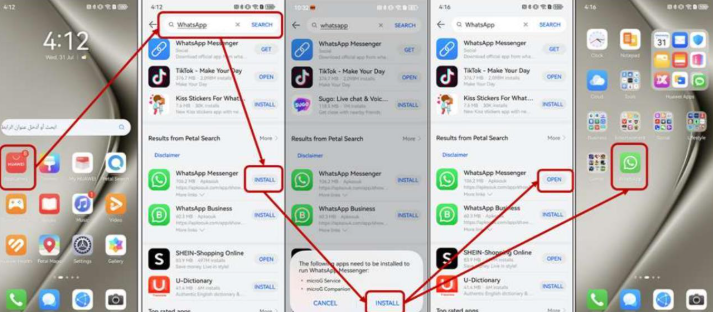
Method 1: Using Huawei AppGallery
To install WhatsApp via the Huawei AppGallery, search for the app within the AppGallery interface. Although it may not offer a direct install, the AppGallery typically provides straightforward links to official WhatsApp downloads. Follow the link to proceed with the installation, ensuring that you download from trusted sources to maintain device security.
Method 2: Downloading APK from Official WhatsApp Website
Visit the official WhatsApp website using your Huawei browser and download the latest APK version of WhatsApp. Before installation, navigate to your device’s settings, select ‘Security,’ and enable ‘Install from Unknown Sources’ to allow third-party app installations. After adjustment, open the downloaded APK file to begin the installation process. Once completed, verify successful installation by launching WhatsApp and following the registration prompts.
Method 3: Utilizing Third-Party App Stores (e.g., APKPure)
Third-party app stores such as APKPure can also provide access to the latest WhatsApp versions. Download and install APKPure on your Huawei device, then search for WhatsApp within the app’s interface. Ensure you verify developer legitimacy before installation. Follow the prompts to install WhatsApp, again enabling ‘Install from Unknown Sources’ if necessary, to complete the process.
Tips for Ensuring WhatsApp Runs Smoothly on Huawei Phones
Ensuring a Stable Internet Connection
To maintain uninterrupted WhatsApp functionality, connect to a reliable Wi-Fi network or ensure a strong mobile data signal. Unstable connections can disrupt messaging and cause delays in media uploads, affecting your overall experience. A stable connection is key for seamless communication and smooth operation of WhatsApp on your device.
Regular WhatsApp Updates and Security Patches
Regularly check for WhatsApp updates through the AppGallery, official website, or third-party app stores to maintain optimal performance and security. Routine updates help protect against vulnerabilities while introducing new features and improvements. Staying up to date ensures your app functions smoothly, offering enhanced features and better security for a more reliable user experience.
Managing App Permissions and Phone Settings
To protect your privacy and enhance functionality, regularly review and manage app permissions. Go to your device settings and adjust permissions, ensuring WhatsApp only has access to essential functions like the microphone or camera when needed. This proactive approach helps safeguard your privacy while ensuring the app operates effectively for your communication needs.
Using Huawei’s Phone Clone Feature for Seamless Transfer
When setting up a new Huawei device, use the Phone Clone feature to transfer your WhatsApp data and settings effortlessly. This tool not only saves time but also ensures that all chats and media are preserved, making the transition between devices seamless and hassle-free, so you can continue your conversations without losing any important information.
Troubleshooting Common Issues with WhatsApp on Huawei Devices
Fixing Installation Errors
Installation errors are often caused by outdated system firmware or missing permissions. To resolve this, ensure your device’s operating system is up to date and verify that all necessary installation permissions are enabled. Once these steps are completed, retry the installation for a smoother process and successful app setup.
Resolving Notification Issues
If WhatsApp notifications are delayed or missing, first check your app settings to ensure notifications are enabled. Also, adjust your battery optimization settings, as they may restrict background data usage, affecting the timely delivery of alerts. By ensuring both are properly configured, you can ensure that WhatsApp notifications are received promptly without issues.
Fixing Media Download and Backup Problems
If media fails to download, check that your internet connection is stable and ensure there is enough storage space on your device. For backup issues, consider using local backups or enabling cloud storage options compatible with your device. This will help secure important data and provide a reliable solution for preserving your files.
Conclusion
Finding efficient methods to operate WhatsApp on Huawei devices can initially seem daunting due to Play Store incompatibility. However, by utilizing alternative installation approaches like the AppGallery or APK downloads, and following practical tips for seamless use, maintaining communication through WhatsApp is attainable. Regular system updates, meticulous settings management, and proactive troubleshooting will further ensure your Huawei device meets all your messaging needs effortlessly.
